Today I wanted to talk a little bit about the "Dodge" and "Burn" tools in Photoshop.
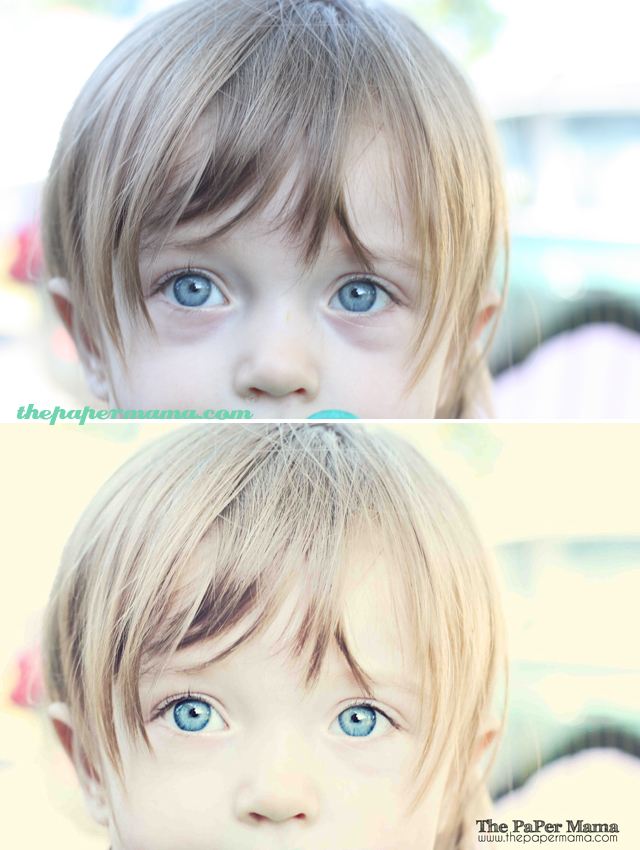
SOOC:
The basic edit: I always start ANY of my photos with the basic edit. This involves the adjusting of the levels, curves, and getting rid of any noise with Noiseware. Then I'll usually sharpen and run one of my favorite actions to brighten up the colors. Then I flatten and save my image.
Dodge and burn: With my basic edit done I'll now take care of any other detailed edits I'd like to do. For this photo I noticed there was a dark shadow on her face. Using the "Dodge" tool at a lowered opacity can get rid of that little bit of shadow. BUT, you need to be careful. Using too much dodge can erase a lot of the details in a photo.
After the shadow I wanted to fix up my shading. I use the burn tool (at a lowered opacity) to add more shade to the photo. By doing this it can really make a photo pop out. I burned a bit on her frown lines and the creases in her eyes. I also shaded under her feet and around the hoodie on the face to intensify the shadow.
Do you ever work with your dodge and burn tools?
After:
AND, if you all have a moment to spare... you can vote for the above photo over at I Heart Faces through Friday. :D We're #106.
Vote for you favorite face of 2010! I'd love if it was Ruari!

Link up your Touch Ups below! Linky's always close at 11:59 PM Wednesday evenings (Pacific time).